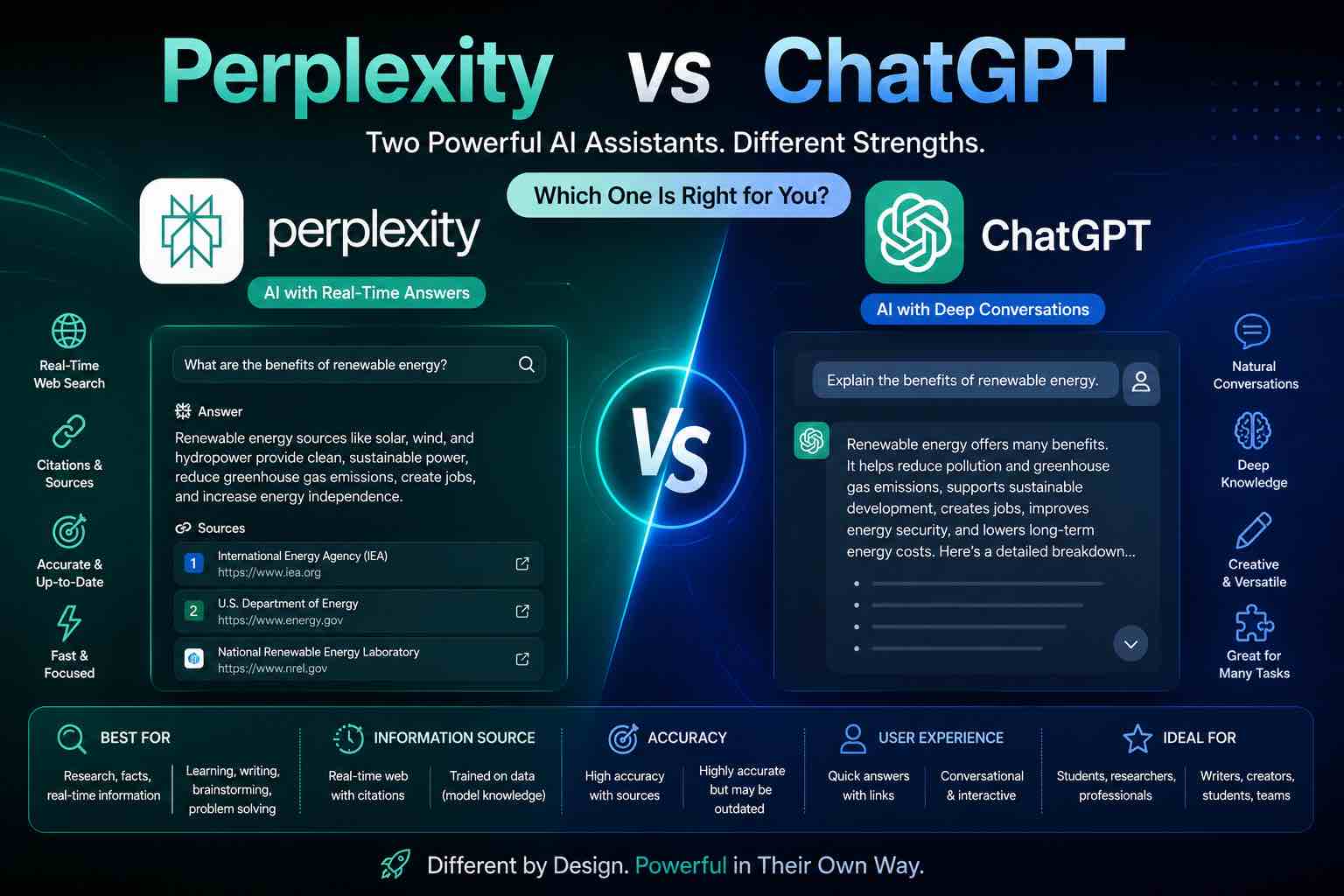
Perplexity vs ChatGPT (2026): Which AI Should You Use?
Perplexity vs ChatGPT compared for research, citations, writing, and everyday work — when to search with sources, when to draft, and which to pick first.
Perplexity vs ChatGPT is a workflow choice: do you need answers with sources, or a flexible drafting partner?
Perplexity shines as an AI-powered research/search layer. ChatGPT shines as a general workbench for writing, reasoning, coding help, and custom workflows. Many operators keep both — but you should pick a default.
Quick verdict
| If you mostly… | Choose |
|---|---|
| Research topics with links to check | Perplexity |
| Draft, rewrite, brainstorm, code, custom GPTs | ChatGPT |
| Do serious research then write | Perplexity → ChatGPT (best combo) |
Broader model shopping: ChatGPT vs Claude vs Gemini · work suite choice: Microsoft Copilot vs ChatGPT.
Side-by-side comparison
| Criteria | Perplexity | ChatGPT |
|---|---|---|
| Core job | AI search / research answers | General assistant & workbench |
| Citations / sources | Strong focus | Available in some modes; not always the default habit |
| Long-form drafting | Good | Excellent |
| Iterative rewriting | Good | Excellent |
| Coding help | Solid | Excellent |
| Custom workflows | Growing | Strong (GPTs, projects, memory features vary by plan) |
| “Blank page” creativity | Good | Excellent |
| Best first question type | “What’s true / what’s current?” | “Help me make this artifact” |
Plans and features change — re-test with your real tasks every quarter.
Perplexity: best for research with a paper trail
Choose Perplexity when you want:
- Fast overviews with sources you can open and verify
- Comparison questions (“X vs Y for small teams”)
- A search-like loop: ask → scan citations → refine
Watch outs:
- Sources can be uneven; click through before you trust a claim
- Not always the best home for multi-step creative projects
- Still can miss context or over-weight weak pages
Best for: students, analysts, founders doing market/tool research, writers collecting evidence.
Research prompt pattern:
Question: {{topic}}
Audience: {{who}}
Constraints:
- Separate facts, claims, and unknowns
- List sources I should verify first
- Flag anything that looks outdated
Output:
1. Short answer
2. Key points with source links
3. What to double-check manually
ChatGPT: best everyday AI workbench
Choose ChatGPT when you want:
- Outlines, drafts, rewrites, and critique loops
- Prompt libraries and repeatable workflows
- Coding help, tutoring, and multimodal drafts (varies by plan)
Watch outs:
- Can sound confident while wrong — especially on niche facts
- “Search-like” answers still need verification
- Easy to skip sources if you don’t ask for them
Best for: creators, operators, students writing/studying, anyone building a personal AI habit.
Prompt craft: Prompt Craft Tutorial.
When Perplexity wins
- “What happened / what changed recently?”
- “Best tools for X — with sources”
- Literature-style scanning before you write
- Competitive or product research with links to cite
When ChatGPT wins
- Turning notes into a tutorial, email, or script
- Multi-step editing (“shorter, sharper, keep my voice”)
- Study drills and practice quizzes (AI for Students)
- Building reusable prompts and SOPs
The winning combo (15–40 minutes)
- Perplexity (research): collect claims + sources (10–15 min)
- Human gate: open the top 3–5 links; discard weak ones (5–10 min)
- ChatGPT (draft): write the artifact from your verified notes (15 min)
Using ONLY the notes below, write {{artifact}}.
Do not invent stats or citations.
If something is missing, ask up to 3 questions.
Notes:
{{paste verified bullets + links}}
This is the same “verify then ship” discipline behind AI Content Workflow in 60 Minutes.
Students & knowledge workers
- Use Perplexity to map a topic and find readings
- Use ChatGPT to quiz yourself, outline essays, and explain hard parts
- Never submit unedited AI text as your own work
More: Best ChatGPT Prompts for Students.
Small businesses
- Perplexity: vendor comparisons, policy scanning, market questions
- ChatGPT: customer replies, SOPs, marketing drafts
See How Small Businesses Can Use ChatGPT.
Pricing mindset
- Pay for Perplexity if research with sources is weekly and free limits block you
- Pay for ChatGPT if it’s your daily drafting/thinking home
- Paying for both is reasonable for research-heavy creators — wasteful if one is idle
Review with your stack habits from Best AI Productivity Tools.
20-minute decision test
Run both on:
- A research question in your niche (score sources + usefulness)
- A rewrite of your own rough paragraph
- A plan (“turn these notes into a checklist”)
Keep the winner for each job. Default to one app on your dock.
Common mistakes
- Treating Perplexity citations as automatically correct
- Using ChatGPT as a search engine without verification
- Drafting long posts before gathering sources
- Buying both on day one without a weekly workflow
- Pasting confidential data into the wrong tool/plan
Closing checklist
- Default tool chosen (Perplexity or ChatGPT)
- Research → verify → draft pipeline tested once
- “No invented citations” rule in your prompts
- One real weekly use case attached
- Second tool optional for the other job
Bottom line: Use Perplexity to find and frame what’s true. Use ChatGPT to turn verified thinking into work products. If you only buy one first, pick based on whether your bottleneck is research or drafting.
Related Articles
Keep exploring on AutoThinkers — these guides pair well with this comparison:
- ChatGPT vs Claude vs Gemini: Which AI Should You Use in 2026?
- Microsoft Copilot vs ChatGPT (2026): Which Should You Use?
- Prompt Craft Tutorial: Write AI Prompts That Survive Real Work
- Tutorial: Build an AI Content Workflow in 60 Minutes
- Best AI Productivity Tools in 2026 (Practical Stack That Saves Hours)
- AI for Students: How to Study Smarter with ChatGPT, Claude & Free AI Tools (2026 Guide)
- Best ChatGPT Prompts for Students
- How Small Businesses Can Use ChatGPT
- The Practical AI Toolkit for Solo Operators (2026)
- Free AI Homework Helpers That Actually Work (2026 Student Guide)
Keep exploring
Related Articles
Continue with 8 closely related AutoThinkers guides — more tutorials to deepen your AI workflow.
Comparisons
6 min read
Microsoft Copilot vs ChatGPT (2026): Which Should You Use?
Microsoft Copilot vs ChatGPT compared for work, Office apps, writing, and everyday tasks — strengths, weaknesses, pricing mindset, and which to pick first.
Comparisons
5 min read
ChatGPT vs Claude vs Gemini: Which AI Should You Use in 2026?
A clear ChatGPT vs Claude vs Gemini comparison for work, study, and content — strengths, weaknesses, pricing mindset, and which model to pick first.
AI Tools
5 min read
How Small Businesses Can Use ChatGPT (Practical 2026 Guide)
How small businesses can use ChatGPT for customer replies, marketing drafts, SOPs, and admin work — with copy-paste prompts and a safe weekly workflow.
AI Content Creation
6 min read
Best AI Voice Generators in 2026 (Practical Creator Guide)
Compare the best AI voice generators in 2026 for YouTube, podcasts, courses, and product demos — quality, cloning ethics, pricing mindset, and which tool to pick first.

Prompt Craft
5 min read
Best ChatGPT Prompts for Students (2026 Copy-Paste Library)
The best ChatGPT prompts for students — study plans, note summaries, practice quizzes, essay outlines, and exam prep templates you can copy today.
AI Content Creation
6 min read
Best AI Image Generators in 2026 (Practical Creator Guide)
Compare the best AI image generators in 2026 — Midjourney, DALL·E, Firefly, Ideogram, and free options — plus prompts, use cases, and which tool to pick first.
Workflows
7 min read
Best AI Productivity Tools in 2026 (Practical Stack That Saves Hours)
The best AI productivity tools for 2026 — writing, meetings, email, notes, and automation — plus a simple stack you can set up in one afternoon.
Prompt Craft
4 min read
Prompt Craft Tutorial: Write AI Prompts That Survive Real Work
A step-by-step prompt engineering tutorial with copy-paste templates for drafting, research, critique, and repetitive operations.